

Cloud Migrations for Oracle
Migrating Oracle to the Cloud
Helping organizations plan cloud migrations, optimize Oracle licensing, and reduce compliance and cost risks.
Overview
Our expert analyst team can help your organization stay in compliance and evaluate licensing opportunities and challenges for cloud migrations of Oracle on-premise products to Oracle Cloud, AWS, Azure, Google, and others.
Many companies are developing “Cloud First” strategies, but that doesn’t mean “cloud only”. A cloud first strategy is an organizational commitment to evaluate cloud-based solutions before considering other alternatives. Unlike a cloud only strategy, it doesn’t entirely eliminate other solutions like hybrid or on-premise environments, allowing for greater flexibility
Cloud Overview
- Advantages and Disadvantages of moving to the cloud
- Hybrid Cloud
- Software as a Service (SaaS)
- Platform as a Service (PaaS)
- Infrastructure as a Service (IaaS)
- On-Premise BYOL Licenses (License Portability)
Cloud Advantages
- Can be quick and easy to create a new server
- No need to worry about hardware upgrades
- Can be less expensive than on-premise solutions
- Security is generally thought of as more thorough solution as typically found on-premise
Cloud Disadvantages
- It can be more expensive to maintain than on-premise solutions
- The process of migrating workloads to the cloud can drain significant time, energy and resources
- Telecommunication costs can be higher
- Security can be a concern if it is primarily handled by the client’s IT people as they would be less familiar with the Public Cloud environment than their on-premise environment
- Fewer options are available in the event of company downturns
- May not meet regulatory compliance standards
Overall, there are many good reasons to leverage a Cloud solution, but it is important to see it as just another consideration along the path of implementing a new solution for your organization.
Cloud Types
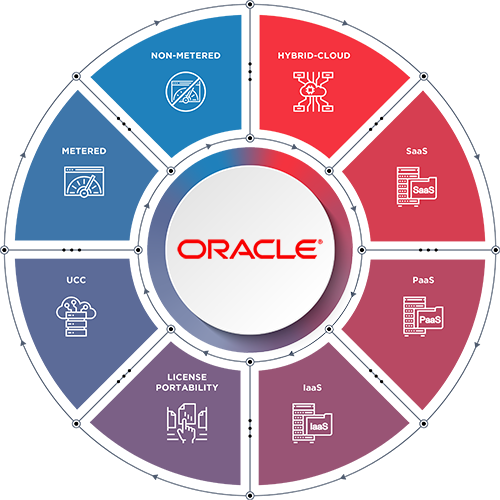
Hybrid Cloud
Hybrid-Cloud has become the most common reality for organizations. Most organizations of a medium-to-large size will have some IT solutions that must remain on-premise due to functionality or business constraints.
Advantages
- Hybrid solutions allow you to maintain a higher level of flexibility to choose the best environment and solution which most effectively addresses specific business problems
- If you have a base of on-premise licenses then you can apply them against the Cloud, or use them to support an on-premise solution
Disadvantages
- Hybrid solutions require you to maintain two different environments in some manner
- You may also find it more difficult to integrate any on-premise with Cloud due to potential latency challenges, as it is vital organizations evaluate the additional network bandwidth requirements that such solutions would likely need
Software as a Service (SaaS)
This is an application solution that is provided at a subscription price and is entirely Cloud based. It involves all aspects of the solution, including both hardware and software. Startups or small organizations are better positioned to support an all Cloud-based set of IT solutions, since they have no legacy applications, and can more easily shift from any they actively have in place.
Advantages
- Generally provides a complete offering that addresses a particular business need. Example: Salesforce
- These usually offer a good level of basic customizations to modify the solution so that it best fits the need for your organization
Disadvantages
- Basic customization of the solution is usually limited to the modification or creation of reports and the addition of some fields
- If heavy customizations were made to an on-premise application solution, it is less likely to work the same way in a SaaS Cloud version of the on-premise application
Platform as a Service (PaaS)
These are Cloud-based software platforms that are provided along with supporting hardware. They are typically a platform in which to provide customized solutions, but are not generally a complete solution within themselves. Rather, they might be considered a utility-type solution. Example: Database Software as a Platform.
Advantages
- Software licenses and hardware are all supplied under a single subscription
- You can apply on-premise Oracle licenses to many PaaS Cloud services
- This allows you to extend your on-premise software investment to the Oracle Cloud
Disadvantages
- Requires the latest version of Database to be in use, which can eliminate some solutions that are not feasible to convert to the newest version
Infrastructure as a Service (IaaS)
This is strictly compute and storage resources supplied within a Cloud environment. This is similar to other Cloud IaaS environments, but Oracle IaaS is designed to run Oracle products the best.
Advantages
- You can apply your Oracle licenses against this environment in a manner that closely matches the performance characteristics of an on-premise solution while potentially leveraging the latest server technology that is maintained within Public Clouds
- You can choose a solution that leverages the shared compute fabric or a bare metal solution which enables you to get more control at the hardware level
- Easy and quick to allocate more server compute resources
Disadvantages
- This generally utilizes Universal Cloud Credits for licensing, which requires that your usage is predictable as pre-paid fees are spread evenly across the individual months of the term of the contract
On-Premise BYOL Licenses (License Portability)
These are licenses that are run from the organization’s own retained locations. This is the ability to take a perpetual license and allocate it for use within a Cloud platform
Advantages
- Leverage existing investment in on-premise licenses by moving them to the cloud
Disadvantages
- Oracle authorized Public Cloud platforms, not including their own, do not calculate licenses exactly the same as in an on-premise environment. Learn more about how to calculate the required licenses for different public clouds here.
Paying for Oracle Cloud Universal Cloud Credits (UCC)
This is Oracle’s latest licensing approach for their IaaS and PaaS platforms. UCC is an entirely metered subscription service that, by default, requires you to forecast your intended Cloud use at least one year in advance. Such a forecast would essentially take the form of a monthly spend.
Advantages
- The spend is not locked into a particular product available on those platforms, as your monies can be applied to any of the products
- Forecasted spend is averaged across the 12 months or term of the subscription contract
Disadvantages
- During the term of the contract you cannot apply unused monies to future months nor can you pull future monies to support months that exceed their forecasted limits
- During heavy use months the organization will pay for any overages separate from their contracts and upwards of 1.5 times the contracted hourly rate for products
Metered
An older subscription method of pay-as-you-go that was generally used for compute resources in the Cloud, this was replaced by Universal Cloud Credits, but may still be part of current contracts.
Non-Metered
An older subscription method that provided a preset monthly cost for a preset list of products and resources. Most commonly used with PaaS products. This was replaced by Universal Credits, but previously activated subscriptions can sometimes be renewed for Non-Metered.
Summary
Contact ECCO to learn more about whether moving to the cloud is right for your organization. We can review your licenses, business goals, costs and areas of concern to provide guidance and advice to achieve the best possible outcome.